Coupon codes
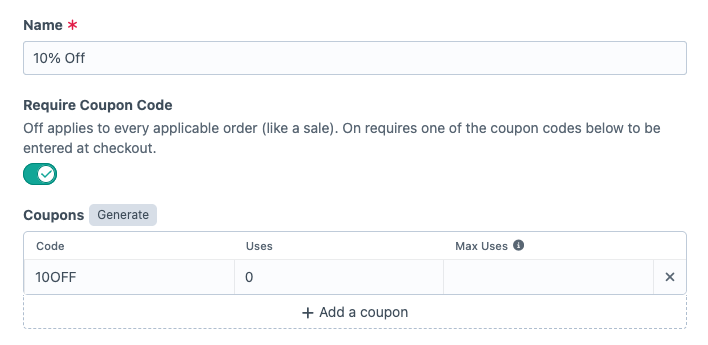
Require Coupon Code sets how a discount is triggered. Off, it applies to every order matching its rules, like a sale. On, the customer has to enter one of its codes at checkout.
Adding codes#
Add codes by hand with Add a coupon, or click Generate for a batch.
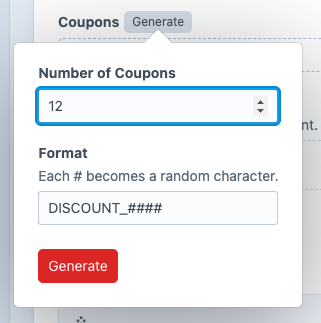
Enter the Number of Coupons and a Format. Each # becomes a random character, so SPRING_#### produces codes like SPRING_A7K2. The default format is DISCOUNT_####.
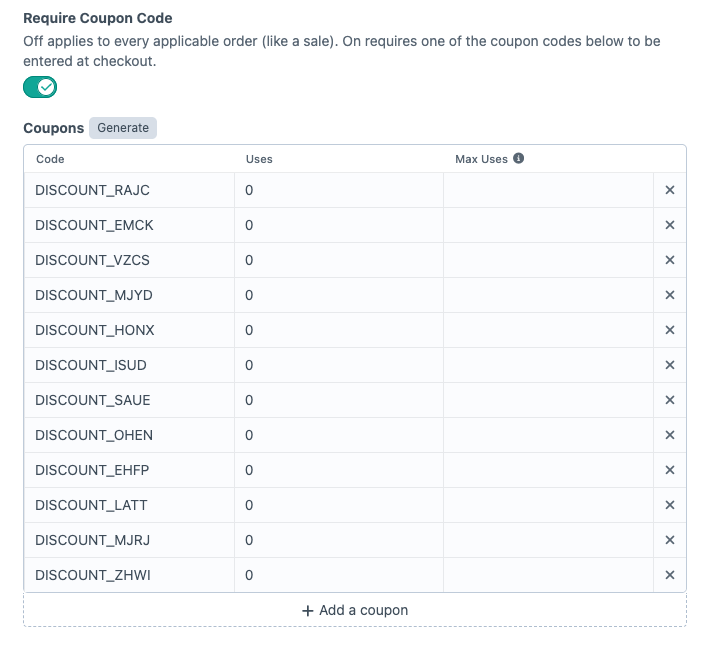
Codes are unique across every discount, not only this one, and a code can’t appear twice on one discount. Generated codes avoid codes already in use, and saving a duplicate by hand fails validation. Matching at checkout ignores case, so BIG10 and big10 are the same code.
Uses and limits#
Uses counts completed orders the discount applied to. The count goes up when the order completes, so a code in an abandoned cart does not count against its limit.
Leave Max Uses blank for unlimited. Once a code’s uses equal Max Uses, the code stops working.
What the customer sees#
If a code is at its limit or belongs to a disabled discount, the plugin removes it from the cart and adds a notice. The notice reads “This coupon has reached its usage limit.” or “This coupon is no longer available.” To show customers why a code was removed, render order.notices in your cart template.
An order holds one coupon code at a time. Entering a second code replaces the first.
Advanced Discounts codes and Commerce’s own coupon codes are separate sets. The plugin leaves a code it does not recognize to Commerce. If the same code exists in both, both discounts apply to the order.
Deleting a discount deletes its codes.