Billing by order
How Net Terms works when the orders themselves are the bills: an order stays unpaid until you record payments against it, and Net Terms does not issue invoices.
Choosing order billing#
Go to Commerce -> Settings -> Gateways, or click Edit gateway beside Billing in Settings -> Plugins -> Net Terms. Open the Net Terms gateway, set Credit Card Payment Type to Authorize only, and click Save. Purchase is invoice billing. The payment type changes only while every account is settled. An account is settled when it owes $0, holds no unapplied credit, and has no unpaid invoice or credit order in the trash. The error lists each account that isn’t. Paid and voided invoices from before a switch stay on their payments’ pages.
| Invoice billing | Order billing | |
|---|---|---|
| An order charged to an account | Is paid at checkout | Stays unpaid, with the charge authorized |
| What the account is billed with | Invoices the plugin issues, one line per buyer | The orders, each with its own balance |
| The record of what is owed and paid | The account’s Ledger tab | Each order’s Transactions tab in Commerce |
| A payment is applied to | Invoice lines | Unpaid and partially paid orders |
| Adjustments | Yes | No. Edit the order instead. |
At checkout#
The Net Terms gateway authorizes the order total instead of purchasing it. The order completes, and Commerce shows it as Unpaid. Name the gateway for what buyers recognize, such as “Pay via check/ACH”. The gateway checks credit limits and sublimits as in invoice billing.
Net Terms records which account and buyer the order charged, and does not write ledger entries. What an order owes is its total less what Commerce shows as paid. What a buyer owes is the sum of their credit orders’ unpaid balances, not counting trashed orders. An overpaid order doesn’t reduce what the buyer owes on other orders.
Each order is due its payment terms after the order date. The account’s Orders tab lists every order charged to the account, with its balance, due date and whether it is overdue.
Payment terms per order#
To give one order its own payment terms, add a Payment terms (Net Terms) field to the order field layout in Commerce -> Settings -> Order Fields.
Staff with Commerce’s Edit orders permission set an order’s terms in the order editor, in whole days, 0 or more. Without that permission, including for customers at the cart, the field keeps its saved value. Beside the input, the field shows the terms of the account the order charges, such as “days. Blank uses the account’s terms, 30 days.” A site module can set the field in PHP with setFieldValue().
An order with a value is due that many days after the order date. A blank value uses the account’s payment terms. If the order field layout has more than one Payment terms (Net Terms) field, Net Terms uses the first. Invoice billing has no per-order terms, because an order’s charge is billed on an invoice with one due date, so the field has no effect there.
Every due date Net Terms shows or uses for the order follows the order’s terms, including reminders and the Record payment form. If you remove the field from the order field layout, every order is due on its account’s terms again.
Recording a payment against orders#
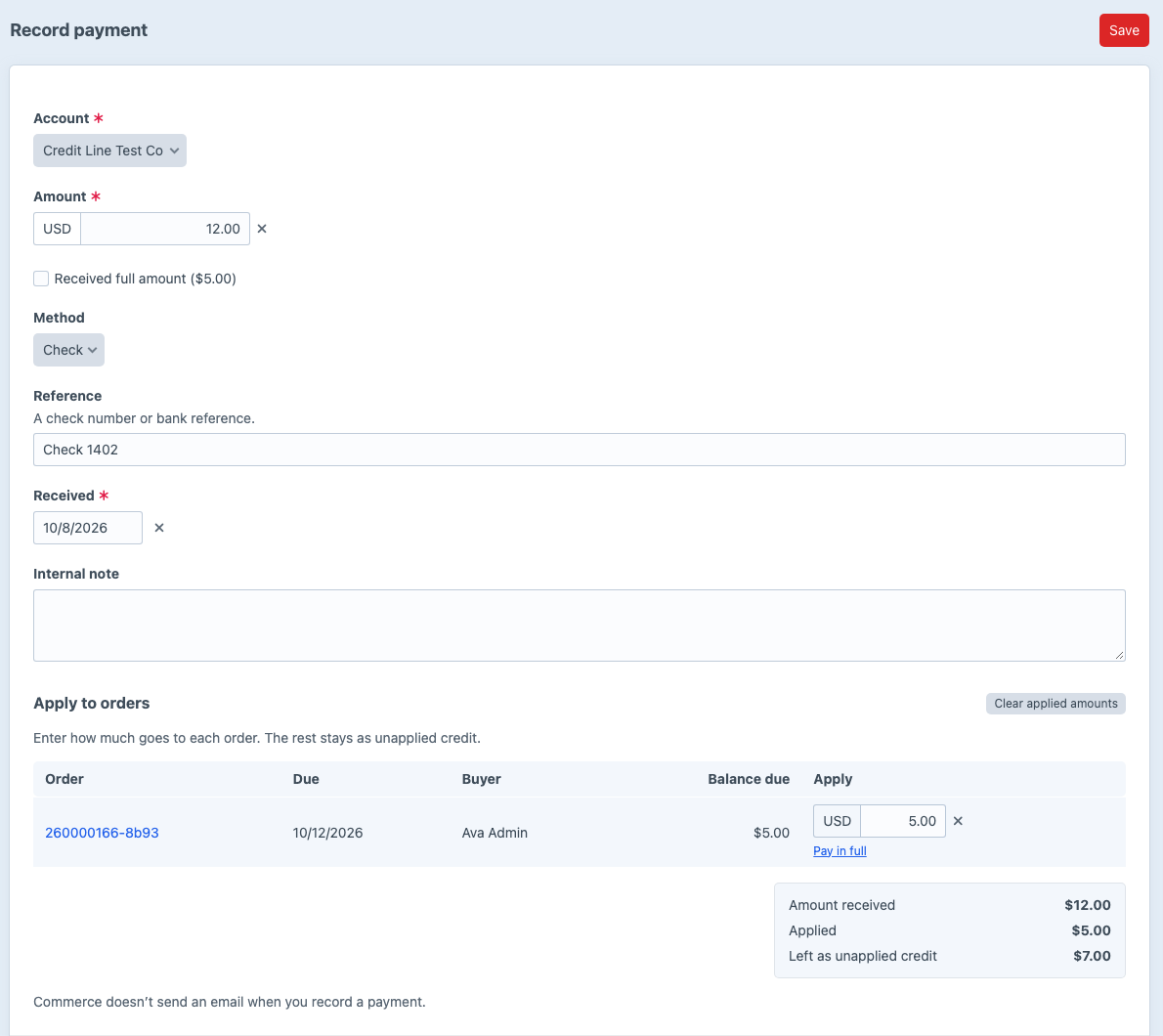
Go to Net Terms -> Payments -> Record payment and choose the account. Apply to orders lists its unpaid and partially paid orders, oldest first. Enter how much of the payment covers each order, as the payer’s remittance says, and click Save.
Net Terms writes each amount you apply to the order as a Commerce capture of the order’s authorization, with the payment’s reference, on the order’s Transactions tab. When an order’s captures add up to its total, Commerce marks the order Paid. Several payments can pay one order. Commerce does not send an email when you record a payment.
Paying an order’s balance online#
The Net Terms gateway is never offered on a completed order. Every gateway whose Match Order conditions match a completed order can pay its balance. To keep a gateway to checkout only, add Commerce’s Completed rule to its Match Order conditions in Commerce -> Settings -> Gateways, turned off. A payment made online is a Commerce transaction on the order, and Net Terms does not record it as a payment. For the storefront page, see storefront templates.
To take a card payment by phone, record it with the Card method instead.
Reminders#
Commerce’s Send Email menu on an order’s page resends any of its emails, such as the order confirmation. To email the customer before and after an order’s due date, see reminders.
Changes after checkout#
Online payments, refunds and order edits happen in Commerce.
- The order is edited. What the buyer owes follows the order’s new total. Net Terms doesn’t check the edit against available credit, so a raise can take the account over its limit.
- A recorded payment is refunded in Commerce. Refund the capture on the order’s Transactions tab. The amount goes back onto the order’s balance and is added to the payment’s Refunded figure.
- A payment was applied to the wrong order. Click Reverse beside it on the payment’s page. Net Terms adds a refund transaction to the order, and the amount goes back to the payment’s unapplied credit. If the order is in the trash, restore it before you reverse the payment.
- The order is deleted. A trashed order stops counting toward what the buyer owes, and the account’s Orders tab doesn’t list it. Restoring the order counts it again. Deleting the order permanently deletes the record of payments applied to it, and those amounts go back to their payments’ unapplied credit.