Overview
The goal of Variant Manager is to make managing a complex product catalog easier in Craft Commerce. Although Craft Commerce offers a system to manually input the data for products and their many variants, it can become quite cumbersome when dealing with a catalog of products that have many variations based on multiple options.
A common method to manage product catalogs for businesses is to use a spreadsheet to keep track of things like stock, SKU’s, prices, and the various options that are included for each item. So rather than trying to shoe-horn product managers into using Craft Commerce’s manual method of data entry for product variants, Variant Manager embraces the spreadsheet approach, allowing you to import and export your product variants directly from your spreadsheet via a CSV file.
Control Panel Dashboard#
Once the plugin is installed and configured, in your Craft Control Panel you will be able to access the Variant Manager dashboard.
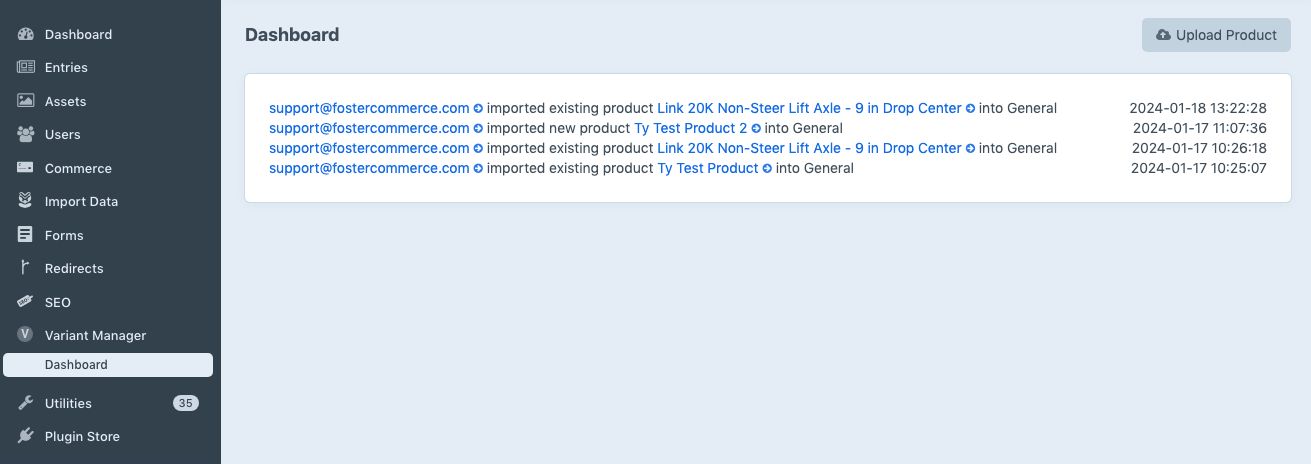
The dashboard will display a history of the imports that have already been made, and an “Upload Product” button which will allow you to upload a CSV file to import your products.
Configuration#
In order for Variant Manager to import your spreadsheet data to create product variants for you, it first needs to be configured to know how to convert column data in your spreadsheet into the various variant attribute options.
The Variant Attributes Field#
Variant Manager provides a “Variant Attributes” custom field type you need to add to your Craft Commerce variant field layouts. This field is used by Variant Manager to save the variant attribute name and value pairs when imports occur, and can be used in your twig templates to allow users to filter variants based on a selection or select a variant based on the variants attribute values.
Setup the Variant Attributes Field →
User Permissions#
Variant Manager allows you to define user and user group permissions for importing and exporting variant data.
Importing Products Variants#
As noted above, Variant Manager will allow you to import your spreadsheet data to create and update Craft Commerce product variants for you.
Importing Product Variant Data →
Exporting Product Variants#
Variant Manager can also export the product variant data from your products. This makes it easy to update a products’ variant attributes and field data without having to do it manually in Commerce.
Exporting Product Variant Data →
Front End Templating#
As noted above, Variant Manager comes with its own custom field type which will also allow you to reference it in your front end twig templates to filter variants based on a selection or select a variant based on the variants attribute values.
Javascript Recipes#
You may want to use a bit of Javascript to filter and select variants without refreshing the page, so we have included some example recipes using Sprig and Alpine for you to use as examples for yout own code: